Introduction
You published the record at `default._bimi`, uploaded the SVG, maybe paid for a certificate, and waited. A week later your emails still arrive in Gmail with a grey initial where the logo should be. Nothing bounced, no error came back, and no dashboard tells you which part is wrong.
A BIMI logo not showing up almost always comes down to one of seven things: DMARC is not enforced on your domain or its parent, the message itself fails DMARC, the record is missing or duplicated, the logo file breaks the SVG Tiny PS rules, the certificate does not match, the mailbox provider does not support BIMI, or it has not yet decided to trust you. Work through them in that order, because each one hides the ones after it.
BIMI Logo Not Showing? Start With What Has To Be True
BIMI is a chain. A receiving server checks DMARC first, then looks up your record, then fetches and validates the logo, and, for some providers, the certificate. If any link fails, the logo silently does not show. The BIMI draft also leaves the final call to each receiver, so a perfect setup still depends on the provider.
| Provider | Certificate | What its own documentation adds |
|---|---|---|
| Gmail | VMC or CMC required | DMARC at quarantine or reject with pct=100. Up to 48 hours after you add the record. A checkmark only with a VMC. |
| Apple Mail | An evidence document, for example a VMC | iOS 16 and macOS Ventura 13 or later, for mail providers Apple has verified. |
| Yahoo | None mentioned | Bulk mail only, and only with sufficient reputation and engagement. |
| Outlook and Microsoft 365 | Not applicable | Not listed as a BIMI supporter by the BIMI Group. |
Sources for each row: Google's Set up BIMI page, Apple's BIMI support in Apple Mail, the Yahoo Sender Hub FAQ and the BIMI Group's support list.
Cause 1: Your DMARC Policy Is Not Enforced
This is the most common reason by a wide margin. A domain at p=none gets no logo anywhere, because the BIMI draft (§7.1) only applies to domains whose DMARC policy is quarantine or reject. Several less obvious records fail the same test:
- A percentage below 100. The draft refuses
p=quarantine; pct=50, and Google says pct must be 100 whatever the policy. - Test mode. Under RFC 9989,
t=yasks receivers to apply one level less, so quarantine becomes none. - A subdomain policy of none.
sp=nonein your record, or in the parent's, blocks BIMI even whenpis enforced. - The parent domain. If you send from
mail.example.com, the draft checks the policy onexample.comtoo. A strict subdomain under a parent still at none fails.
dig +short TXT _dmarc.mail.example.com
dig +short TXT _dmarc.example.com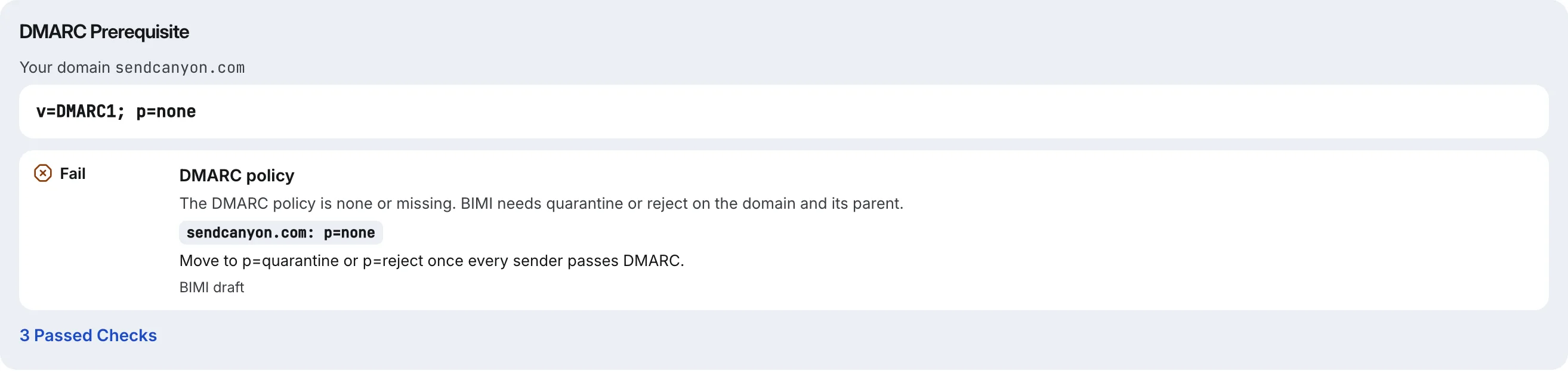
The fix is to move to enforcement, and to do it carefully, because jumping straight to reject can bounce your own mail. Our walkthrough of SPF, DKIM and DMARC explains what each record does before you tighten it.
Cause 2: The Message Itself Fails DMARC
An enforced policy is not enough on its own. Each message has to pass DMARC, which means SPF or DKIM must pass for a domain that matches the From address. A newsletter tool that signs with its own domain, or a help desk whose Return-Path is its own, can pass SPF and DKIM and still fail DMARC for you. Those messages never get the logo, while mail from your main mailbox does.
Open a message that should carry the logo and view its headers (in Gmail, Show original). Look for dmarc=pass in the Authentication-Results line, and check that the header.d= value in the DKIM result is your domain, not the sending service's. If it fails, turn on DKIM signing with your own domain in that service.
Cause 3: The Record Is Missing, Misplaced Or Duplicated
The record must be a TXT record named default._bimi on your sending domain, starting with v=BIMI1. Three mistakes come up again and again:
- The host is doubled. Typing the full name into a DNS panel that appends your domain creates
default._bimi.example.com.example.com. - There are two records. When more than one
v=BIMI1record exists at the name, the draft says to use neither. - The URL is not HTTPS. Both
l=anda=must behttps:addresses.
dig +short TXT default._bimi.example.com
"v=BIMI1; l=https://example.com/bimi/logo.svg; a=https://example.com/bimi/certificate.pem"
If you send with a selector other than default, every message must carry a BIMI-Selector header naming it. Without that header, receivers look only at default._bimi.
Cause 4: The Logo File Breaks SVG Tiny PS
A normal SVG export is not enough. BIMI logos must use the SVG Tiny PS profile: version="1.2", baseProfile="tiny-ps", one title, no scripts, no embedded images, no links to other files, and no x or y on the root element. Gmail adds a minimum absolute size of 96 pixels and a 32 KB file. The file also has to be reachable: request it yourself and look at the response.
curl -sI https://example.com/bimi/logo.svg
# expect: HTTP/2 200 and content-type: image/svg+xml
A 301 or 302 response, an HTML error page or a content type of text/plain are all worth fixing. Point l= at the final address of the file, not at a redirect.
Cause 5: The Certificate Is Missing, Expired Or Mismatched
Gmail needs a Verified Mark Certificate or a Common Mark Certificate, and Apple Mail names a VMC as its example of the evidence it needs. If you have published a record with no a= tag, Yahoo and some other providers may still show your logo while Gmail never will. That split is the usual answer to "it works in Yahoo but not Gmail".
If you do have one, check three things. Mark certificates last at most 398 days under the BIMI Group's Mark Certificate Requirements (§6.3.2), so an expired one is easy to miss. The certificate must name your domain. And the logo inside it should be the same file you host at l=: replacing the hosted SVG after the certificate was issued is a common way to break a working setup.
curl -s https://example.com/bimi/certificate.pem -o cert.pem
openssl x509 -in cert.pem -noout -subject -enddate -ext subjectAltName
Cause 6: The Mailbox Does Not Support BIMI
Outlook and Microsoft 365 do not display BIMI logos, whatever you publish. Apple Mail shows them only on iOS 16, iPadOS 16 and macOS Ventura 13 or later, and only for mail providers Apple has verified. Testing from a single Outlook inbox tells you nothing about BIMI; test with a Gmail address and, if you send bulk mail, a Yahoo address.
Cause 7: The Provider Has Not Decided To Trust You Yet
When everything above checks out, time and reputation are left. Google says logos can take up to 48 hours to appear after you add the record. Yahoo shows logos only for bulk mail with sufficient reputation and engagement. A new domain or one with high complaint rates can be technically ready and still not get a logo. There is no switch to flip here; it follows from sending mail people want.
BIMI Troubleshooting Questions
How Long Does It Take For A BIMI Logo To Show?
Google says up to 48 hours after you add the record, and DNS caches can add time on top. Yahoo notes that a changed record takes time to propagate through its systems. If nothing appears after a few days, the delay is not the cause; go back through the checks above.
Why Does My Logo Show In Yahoo But Not Gmail?
Almost always the certificate. Yahoo's guidance does not mention one, so a record with only a logo address can work there. Gmail requires a VMC or a CMC referenced by the a= tag. Gmail also asks for an absolute logo size of at least 96 pixels and pct=100 on your DMARC record.
Can I Use BIMI With A DMARC Policy Of None?
No. The BIMI draft and Google both require quarantine or reject, applied to all mail. A policy of none, a percentage below 100, test mode with t=y, or a parent domain at none each stop the logo, even if every other part of your setup is correct.
Will BIMI Show On Cold Email From A New Domain?
It can, once DMARC is enforced and the rest checks out, but providers also weigh reputation. Yahoo states it shows logos only for bulk mail with enough reputation and engagement. A domain a few weeks old, sending low volume, should expect to wait, and BIMI does not change how spam filters score the mail.
How SendCanyon Handles This
The free BIMI record generator runs causes one, three, four and five in one pass against live DNS. It reads the DMARC policy on your domain and on its parent, including pct, t=y and sp=none. It looks up default._bimi on both, flags duplicate records, fetches your logo and tests it against the SVG Tiny PS schema and Gmail's size rule, and, if you give it a certificate address, reports the certificate's type, expiry and domains and warns when its logo differs from your hosted file. The verdict counts what failed and never claims the logo will show, because the provider decides that.
For cause two, SendCanyon checks SPF, DKIM and DMARC on every sending domain before a campaign can use it and re-checks verified domains every six hours. The inbox placement test reads BIMI, DMARC alignment and the receiving provider's own Authentication-Results verdict on a message that actually arrived, which is the closest you can get to seeing what a provider saw. Our inbox placement test guide explains how to read those results.
Keep reading
- DeliverabilityDMARC Fail But SPF Pass: Fixing DMARC AlignmentSPF passes, DKIM passes, and DMARC still fails. Learn what DMARC alignment compares, how to spot the mismatch in a header, and the fix for each common cause.6 min read
- DeliverabilityPlain Text Or HTML For Cold Email? What We MeasuredWe sent one cold email through a spam filter as plain text, clean HTML, HTML-only and bloated HTML. HTML itself cost nothing; what it carried in did.8 min read