Introduction
You spent an afternoon building a clean HTML template: logo, brand colours, a neat signature. Since switching to it, replies have thinned out, and the advice you keep hearing is "always send cold email as plain text", usually with the explanation that spam filters punish HTML. That explanation is not quite right, and knowing the real reason tells you exactly what to fix.
We took one short cold email, built it six different ways, and scored each version with a spam filter and a full set of content checks. Clean HTML scored exactly the same as plain text. The penalties came from what HTML makes easy: missing text parts, missing headers, bloat, images and hidden text.
What Plain Text And HTML Mean To A Mail Server
Your email client hides this, but every message is a MIME document with one or more parts, each with a content type. A plain-text email has a single text/plain part. An "HTML email" can be two quite different things: a single text/html part, or a multipart/alternative message that carries a plain-text part and an HTML part of the same content, so each client shows the best one it can render (the structure is defined in RFC 2046, section 5.1.4).
MIME-Version: 1.0
Content-Type: multipart/alternative; boundary="b1"

--b1
Content-Type: text/plain; charset=utf-8

Hi Dana, saw that Northwind is hiring three SDRs...

--b1
Content-Type: text/html; charset=utf-8

<p>Hi Dana,</p><p>Saw that Northwind is hiring three SDRs...</p>

--b1--
A spam filter reads the structure as well as the words. Whether a text part exists, whether it says the same thing as the HTML, and which headers are present are all scored before anyone looks at your copy.
The Test
The email was a 92-word first touch from a fictional sender, Mark Ellis <[email protected]>: one specific reason for writing, one link to a case study on the sender's own domain, one question, and an opt-out line. We built it six ways and ran each through the same spam filter and content checks our free template checker uses. A score of 100 means no check raised anything; the spam filter threshold was 5.0.
| Version | Content score | Spam filter | What was flagged |
|---|---|---|---|
| Plain text | 100 | 0 | Nothing |
| Simple HTML, sent as multipart/alternative | 100 | 0 | Nothing |
| The same HTML as a lone text/html part | 94 | 0.7 | No plain-text part; two spam filter rules for an HTML-only message |
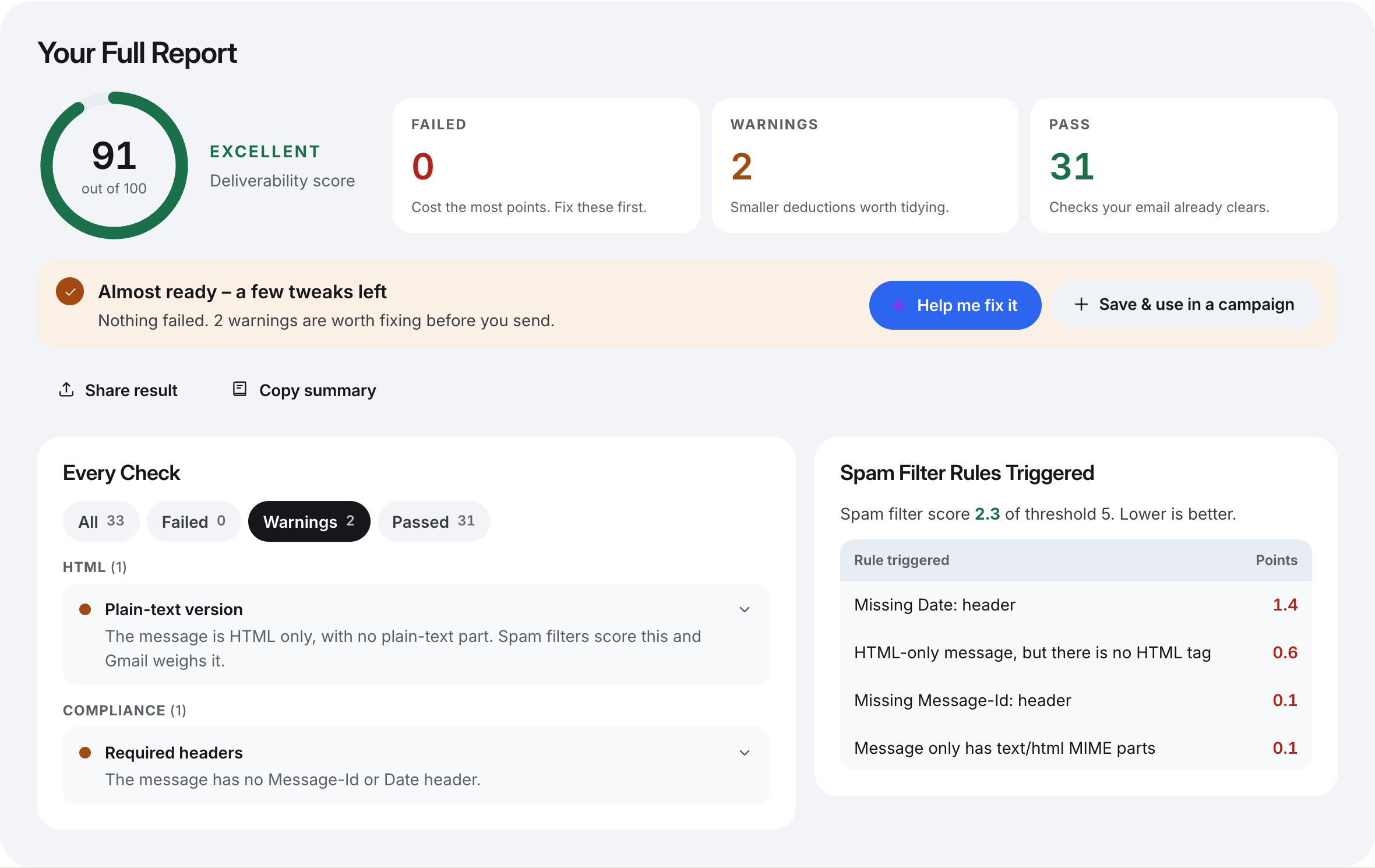
| HTML-only, built without Date or Message-ID headers | 91 | 2.3 | No plain-text part; missing Date and Message-ID headers |
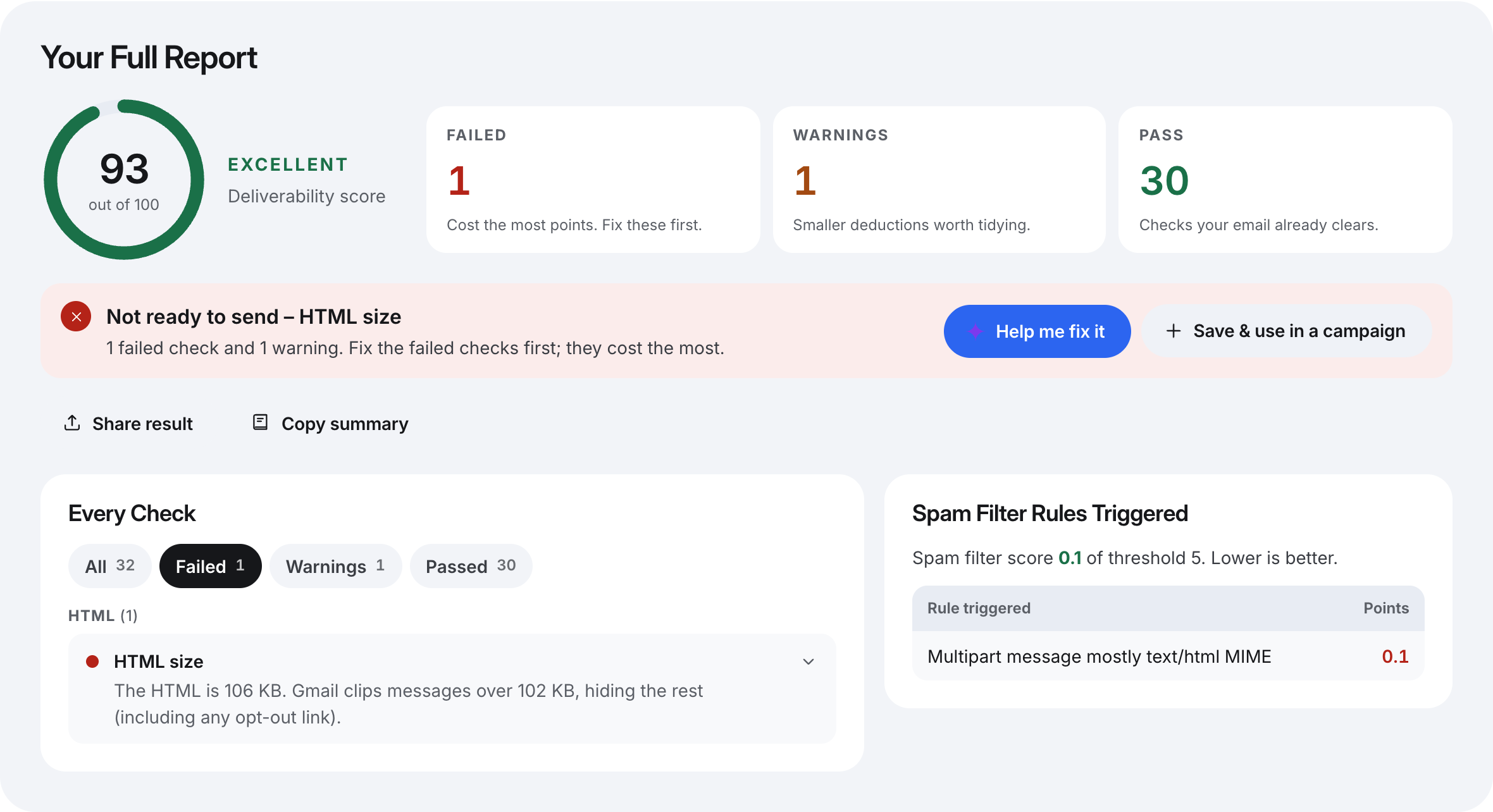
| The HTML padded to 106 KB with layout rows and comments | 93, not ready | 0.1 | Over Gmail's clipping size (a failed check); large comment block |
| The HTML pasted into a plain-text body | 94 | 0 | Raw tags would be shown to the reader |
Rule weights depend on the filter and its configuration, so treat the exact points as what our filter returned on the day, not universal constants. The shape of the results is what carries over.
Clean HTML Cost Nothing
The second row is the one that surprises people. Paragraph tags, a line break and one ordinary link, sent with a plain-text alternative, scored identically to the plain-text version: 100 on content, 0 on the spam filter. Nothing in the filter's rules objects to HTML as such. Google's own sender guidelines don't ask you to avoid it either; they ask that "if your messages are in HTML, format them according to HTML standards" (Google's email sender guidelines).
So the honest version of the rule is narrower: HTML is not the problem, but almost every way an HTML email goes wrong is invisible to the person writing it.
What HTML Brings In With It
A Message With No Plain-Text Part
Sending the same HTML as a lone text/html part cost 6 content points for the missing plain-text part, and 0.7 spam filter points across two rules: one for a message with only HTML parts, and one for an HTML-only message whose body has no <html> tag. That is small on its own. It matters because it stacks: it is the kind of point that turns a borderline 4.5 into a 5.2. Hand-written sending scripts are a common source of this shape, because setting an html field is easier than generating a matching text version.
The fix is mechanical: send multipart/alternative with a text part generated from the same content. If you already do, check that the text part is the whole message, not a stub.
Missing Date And Message-ID Headers
The fourth version is what a hand-built send can look like when the code skips the headers a mail library normally adds. Its spam filter score was 2.3, and a missing Date: header alone was worth 1.4 of that. RFC 5322 makes the origination date one of only two header fields every message must carry (RFC 5322, section 3.6), and Google's guidelines say to "make sure every message includes a valid Message-ID". A proper mail server or library adds both; a template tool that sends HTML through a homemade SMTP call may not.
Bloat And Gmail Clipping
Email built in a design tool carries table layouts, repeated inline styles and comments. We padded the clean HTML to 106 KB with spacer rows, inline styles and comments, the way exported templates grow. The spam filter barely moved (0.1), but the content check failed: Gmail clips the HTML of a message larger than about 102 KB and shows a "[Message clipped]" link, so everything after the cut — your signature, and any opt-out line — is hidden. A failed check means the message is not ready to send even though its score, 93, is still in the Excellent band.
Cold email never needs layout tables. If your template is more than a few kilobytes, the extra weight is markup the reader cannot see.
Tags Pasted Into A Plain-Text Body
The last version is the opposite mistake: HTML pasted into a step that sends as plain text. No filter rule fires, because to a filter the body is just text containing angle brackets. The reader, however, sees <p>Hi Dana,</p> on screen. It costs nothing in spam points and everything in credibility, which is why it is a content check rather than a filter rule.
Images, Tracking Pixels And Hidden Text
These are the things only HTML can carry, and they are where real templates lose points. When we ran a typical design-tool template through the same filter, a single banner image above roughly fifty words was worth 1.6 spam filter points on its own, the largest rule in that email. A 1×1 tracking image, a hidden preheader line and a layout with four fonts and five text colours each raised their own warning. Google is explicit about the hidden part: "Don't use HTML and CSS to hide content in your messages. Hiding content might cause messages to be marked as spam."
Why Plain Text Still Wins For A First Email
If clean HTML scores the same, why default to plain text at all? Three reasons, none of which is the spam score.
- It cannot carry the risky parts. A
text/plainmessage has no images, no pixel, no hidden text, no layout and no link text that differs from its address. Every failure mode in the section above is impossible by construction. - It reads as a note from a person. A stranger's email that looks designed reads as marketing, and readers report marketing they did not ask for. Complaints feed your domain's reputation far more than any rule score.
- It removes open tracking. Open tracking works by loading an image, which needs an HTML part. Opens are a weak signal anyway: Apple's Mail Privacy Protection loads remote content privately in the background, whether or not the message is read (Apple support). Judging a cold campaign by replies loses very little.
When HTML Is Fine
HTML is reasonable when you need something plain text cannot do well: a link with descriptive text instead of a long URL, a bold phrase, or a signature with a link to your site. The test is whether the email would look like something you typed in your own mail client. Keep to paragraphs, links and the occasional bold; no images, no tables, no colours, no hidden preheader. And make sure it goes out as multipart/alternative, with a text part that says the same thing.
A Checklist For Either Format
- Plain text for the first touch unless you have a specific reason for HTML.
- If HTML, a
multipart/alternativemessage whose text part carries the whole message. DateandMessage-IDheaders present (send one to yourself and view the original message to confirm).- HTML well under 102 KB, with no layout tables, comments or external stylesheets.
- No images in a first email, no tracking pixel, no hidden text.
- Link text that is either plain words or the exact address it points to.
- No raw tags in a step that sends as plain text.
How SendCanyon Handles This
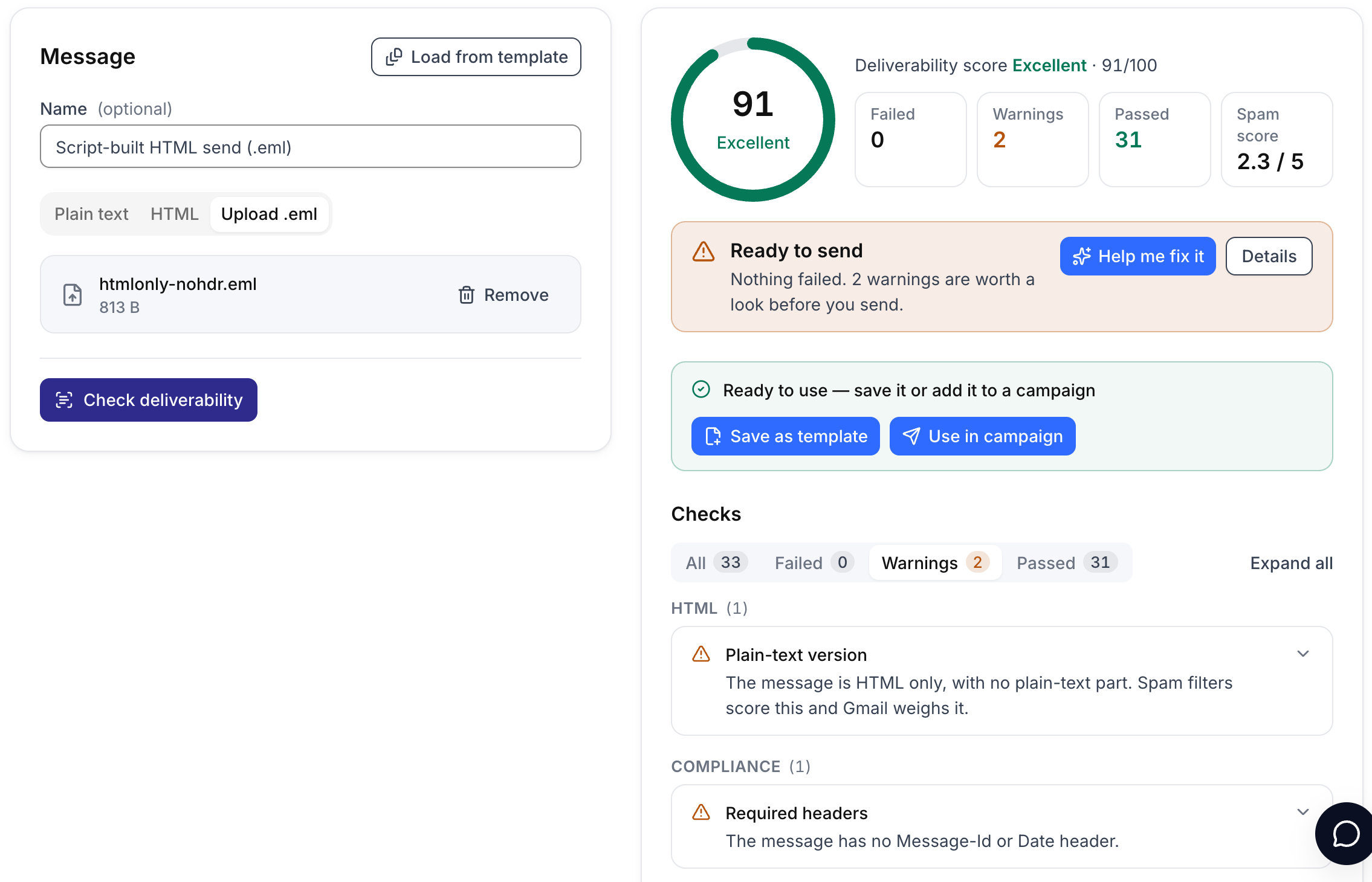
The free email template checker runs every check in this post. Paste plain text or HTML to see the content checks and the spam filter score for the message as it would be built. To test the MIME structure and headers your current tool really produces, send the email to yourself, export it as an .eml file and upload that instead: the spam filter scores an .eml exactly as it arrived, headers and all.
When you send from SendCanyon, the structural part is handled for you. An HTML step goes out as multipart/alternative, with the plain-text part generated from the same body, and a plain-text step stays plain text. If open and click tracking is on for the campaign, links in a plain-text step are rewritten for click tracking but no pixel is added, because a text part cannot carry one; tracking is a switch on each campaign's Sending tab. While you write a step, the sequence editor's live deliverability score flags HTML tags in a plain-text step, oversized HTML, hidden text and image-heavy layouts as you type. The template checker guide explains how each check is weighted, and our post on testing a template for spam covers the rest of the pre-send routine.
Keep reading
- DeliverabilityBIMI Logo Not Showing? Seven Causes And How To Fix EachBIMI logo not showing in Gmail, Apple Mail or Yahoo? Check these seven causes in order, from DMARC policy to certificate, with the exact command for each one.7 min read
- DeliverabilityDMARC Fail But SPF Pass: Fixing DMARC AlignmentSPF passes, DKIM passes, and DMARC still fails. Learn what DMARC alignment compares, how to spot the mismatch in a header, and the fix for each common cause.6 min read