Introduction
Warmup is usually treated as something a mailbox does once, when it is new. Then it is "warmed", and that label stays on it forever. Reputation does not work like that. It is built from recent sending and recent reactions, and a mailbox that has been silent for months, or that just ran a campaign into a bad list, is not in the state its label says.
The short version: re-warm a mailbox when its recent history no longer supports the volume you want to send: after a long break, after a bounce or complaint spike, or after a block has been lifted. Fix the cause first, take the mailbox out of campaigns, and run the ramp again from a low daily volume. Re-warming cannot fix a bad list, missing authentication or an active blocklist listing.
When A Warmed Mailbox Needs Warming Again
| Situation | Why it matters | Re-warm? |
|---|---|---|
| The mailbox has not sent for weeks or months | Receiving servers have little recent history to judge it by | Yes, before it carries cold email again |
| A campaign bounced or drew complaints heavily | The last thing receivers saw from it was bad | Yes, once the list is cleaned |
| Delivery recovered after a block or blocklist removal | Going straight back to full volume repeats what caused it | Yes, after the listing is gone |
| You are about to raise its daily volume a lot | A big jump looks like a different sender | Raise gradually instead; a full restart is rarely needed |
| Mail is landing in spam because of authentication | Warmup cannot make a failing message pass | No: fix SPF, DKIM and DMARC first |
No mailbox provider publishes how long a sender's reputation lasts without sending, so there is no exact number of idle days that means "re-warm now". Judge it by what the mailbox has done recently, not by its age: a mailbox that sent nothing last quarter is effectively new to the servers receiving its mail.
Fix The Cause Before You Restart
A ramp builds reputation from good signals. If the thing that damaged the reputation is still there, the restarted mailbox runs into it again at the end of the ramp. Before restarting:
- Read what went wrong. Bounce codes say whether the problem was the list (5.1.1 unknown users), your pace (4.7.28 rate limits) or your setup (5.7.x policy rejections). Why did my email bounce shows how to read them.
- Clean the list. Remove hard bounces and verify the rest. How to clean an email list covers the order.
- Check authentication. SPF, DKIM and DMARC must pass and align with the From domain. See SPF, DKIM and DMARC explained.
- Check blocklists. Run the domain and sending IP through the blacklist checker, and follow each list's own removal process.
How To Re-Warm, Step By Step
- Take the mailbox out of cold email. Its campaign volume stops while it re-warms. Other mailboxes in the same campaigns can keep sending.
- Start low. A handful of warmup emails a day, to mailboxes that will open and reply, not to cold prospects.
- Grow in small steps. Raise the daily volume by a modest percentage each day rather than doubling it.
- Only move up when engagement holds. If the previous day's messages are not being opened in the inbox, stay at the same volume until they are.
- Return to cold email gradually. When the ramp finishes, start campaigns at a lower daily cap than before and raise it over a week or two, watching bounces and replies.
The first four weeks of a fresh ramp are covered in detail in the warmup ramp schedule; a re-warm follows the same shape.
After The Re-Warm
- Cap campaigns below the old peak for the first week back.
- Set an automatic stop so the next bad list pauses on its own; see auto-pause on high bounce or spam rates.
- Keep the mailbox sending regularly. A steady modest volume protects reputation better than bursts followed by silence.
Re-Warming Questions
How Long Does It Take To Re-Warm An Email Account?
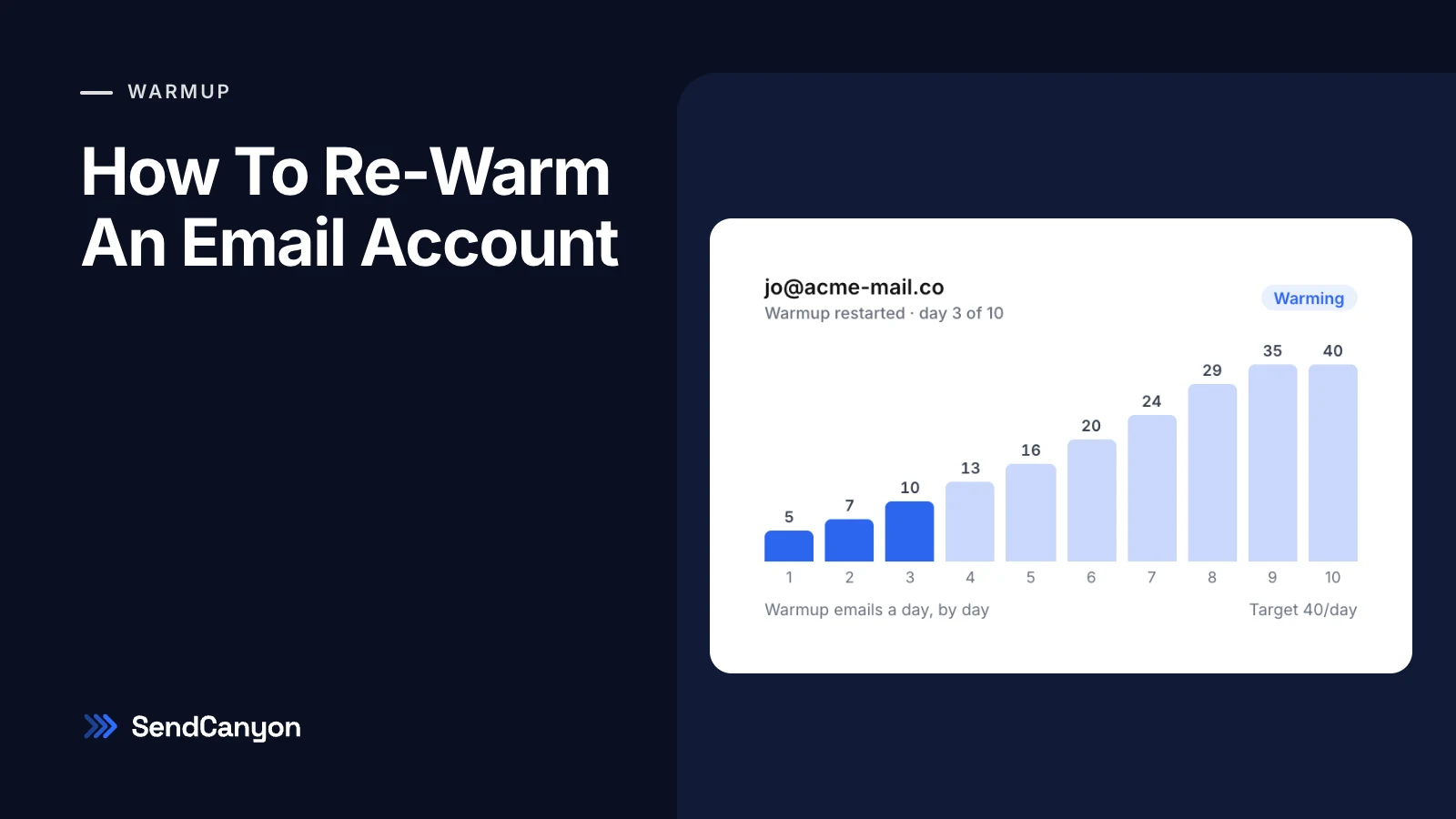
As long as the ramp takes to reach the volume you need, and only if engagement holds each day. A ramp that grows about 15% a day from 5 emails reaches 40 a day in ten steps, so at least ten days, longer if any day holds.
Do I Re-Warm The Domain Or The Mailbox?
Reputation is tracked for both. Warmup runs per mailbox, so if a whole domain was damaged, re-warm the mailboxes on it and keep its total volume low until they are done.
Is A New Mailbox Better Than Re-Warming An Old One?
Not automatically. A new mailbox on the same domain still inherits the domain's history, and it starts with no history of its own. If the cause is fixed, re-warming the existing mailbox is usually the simpler path.
Restarting Warmup In SendCanyon
In SendCanyon, open Sender Accounts → External mailboxes, find the mailbox and open its warmup menu (the flame icon on its row). For a mailbox that is already warmed, the menu offers Restart warmup; workspace admins can use it. A confirmation says what happens: the ramp starts again from day one, and campaigns stop sending from this mailbox until it is warmed. Its status changes to warming, and campaigns that also use other warmed mailboxes keep sending from them.
The restarted ramp begins at 5 warmup emails a day and grows by about 15% plus one each day until it reaches the mailbox's warmup target, 40 a day by default: 5, 7, 10, 13, 16, 20, 24, 29, 35 and 40. Warmup emails go to other mailboxes in SendCanyon's peer network, and the ramp only moves up after a full day and when at least 60% of that day's warmup emails were confirmed opened in the receiving mailbox. Otherwise it holds at the same volume. When the last step completes, the mailbox is marked warmed and goes back into campaign rotation.
Keep reading
- DeliverabilityNew Domain For Cold Email: The Checklist Before Your First SendBought a new domain for cold email? The setup checklist before the first send: DNS records, a real website, MX, warmup, and the volume a domain with no history can carry.4 min read
- DeliverabilityEmail Spam Score: What It Measures And How To Lower ItWhat an email spam score is, how a spam filter adds up its rules against a threshold, what a good score is, and the edits that lower it, rule by rule.4 min read